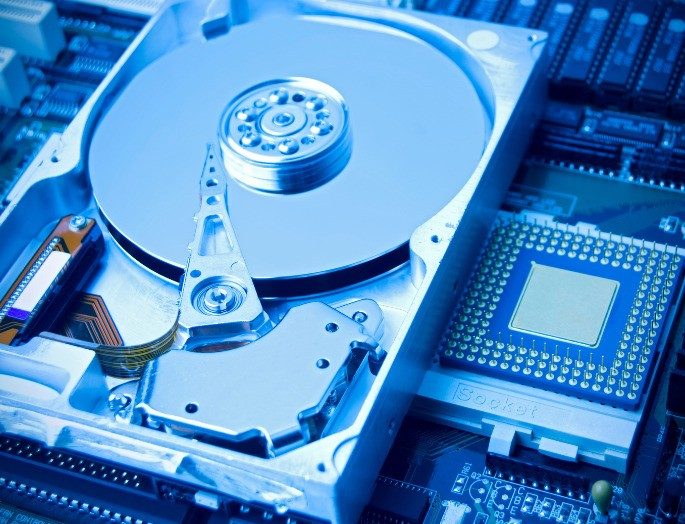
A hard drive is a data storage device that relies on magnetic disks to save your information. You might know it by its English acronym, HDD, which stands for Hard Disk Drive.
How Hard Disk Drives Work
At its core, an HDD uses spinning platters coated in magnetic material to record and retrieve data. Think of it as a mechanical library where the books are laid flat, and a tiny needle reads or writes information as the stack spins. This physical movement is what distinguishes it from solid-state alternatives.
Why It Matters
Despite the rise of faster, flash-based storage, hard drives remain a staple in computing. They offer a cost-effective solution for storing large volumes of data. When you need to keep years of photos, videos, or backups, the HDD is often the pragmatic choice due to its capacity and price point per gigabyte.
“Hard drives use magnetic disks to store data physically, unlike solid-state drives which use electronic circuits.”
The Trade-Off
The mechanical nature of an HDD means it has moving parts. This makes it slightly slower than modern SSDs but generally more durable for long-term archival if handled correctly. Understanding this technology helps you make better choices when upgrading your computer or setting up a home server.
Choosing the Right Storage
When deciding between storage types, consider your needs. For speed, SSDs win. For sheer capacity and budget, HDDs still hold their ground. Knowing how data is physically stored on those spinning magnets gives you a clearer picture of what you are buying.
Your computer’s memory relies on a specific component to keep files alive even when the power is cut. This device stores data permanently. It does not require electricity to maintain those records. That is why it serves as the long-term storage solution. It also handles the initial boot process for the machine. When this hardware sits inside the case, we call it an internal hard drive.
The mechanics are surprisingly physical. Data lives on spinning platters. These discs are coated in a magnetic material. To access information, the drive uses read-write heads. These heads hover just above the surface of the spinning platters. The platters rotate at high speeds. The heads move across the disk to write or retrieve bits. This mechanical dance is what makes the storage possible.
The Four Main Hard Drive Types
There are four primary categories of hard drives you will encounter. They differ in architecture and use case.
- SSD : Solid State Drives share composition with USB flash drives. They have no moving parts.
- SATA III : These are the traditional rigid drives found inside most standard computers. They use magnetic storage across multiple platters. The drive spins fast while a head reads the data.
- SCSI : Small Computer System Interface drives are built for professional use. You typically find them grouped together in server racks.
- SAS : This is the modern evolution of the SCSI standard. It offers higher performance for enterprise environments.
Hard drives are not just about storage capacity. They are the bridge between your hardware and your operating system.
Internal vs. External Hard Drives
The distinction between internal and external drives comes down to connectivity and enclosure. An internal drive connects directly to the motherboard. It gets power from the computer’s power supply unit. It is tucked away inside the chassis. An external drive sits in its own case. It connects via a cable like USB or FireWire. It draws power from the port or its own adapter. Both types can use the same underlying technology. But the external version offers portability. The internal version offers speed and integration.
La ubicación lo cambia todo. El disco duro interno vive escondido dentro de la carcasa del ordenador. Está pegado a la placa base sin intermediarios. Es el cerebro del almacenamiento. Aquí residen el sistema operativo, las aplicaciones que usas a diario y tus archivos personales. No tiene adorno. No tiene protección física contra golpes. Es pura conexión directa.
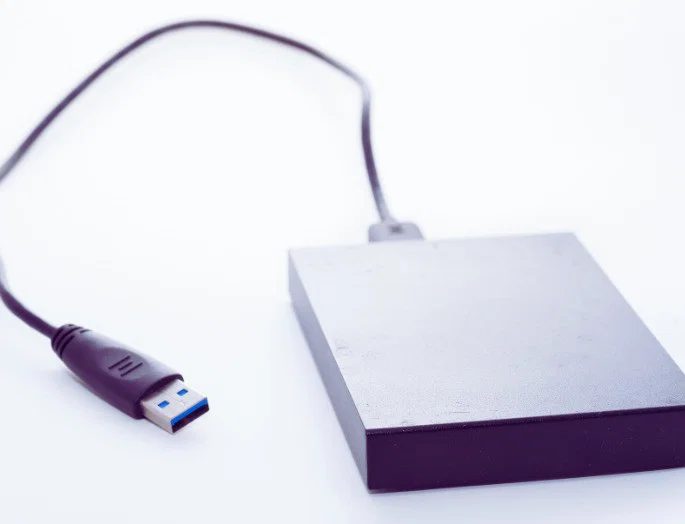
Los discos duros externos son otra historia. Son unidades portátiles que viajan contigo. Se conectan mediante un cable USB o Thunderbolt. No forman parte del ordenador. Tienen su propia carcasa para proteger la lógica interna durante el transporte. Sirven para copias de seguridad rápidas o para llevar archivos de una máquina a otra sin necesidad de redes.
La lógica subyacente es idéntica. Un HDD externo sigue funcionando con la interfaz SATAIII. El motor gira. Los platos se mueven. Solo que ahora tiene una caja de plástico o metal alrededor. Es la misma tecnología, solo que aislada.
Pero entonces llegan los discos duros SSD portátiles y el juego cambia de reglas.
No son solo discos externos más rápidos. Son una evolución tecnológica que redefine la portabilidad. ¿Por qué importa esto en tu vida real? Porque el tiempo es dinero, y la fricción mental de esperar a que cargue un archivo pesa más de lo que crees.
Los SSD portátiles ofrecen características que los HDD tradicionales simplemente no pueden igualar:
- Son silenciosos. Sin partes mecánicas que giren, no hay ruido de motor. El silencio es el nuevo estándar.
- Son más rápidos. La transferencia de datos es casi instantánea. Arrancar un proyecto pesado no requiere paciencia.
- Consumen menos energía. La batería de tu portátil dura más porque el disco no tira de ella como un vampiro.
- Son más resistentes. Sin platos giratorios, un golpe accidental no destruye tu disco duro. La caída desde la mesa ya no es un evento catastrófico.
La resistencia física es el factor decisivo. Un disco externo clásico puede morir si lo dejas caer sobre una superficie dura. Un SSD externo sobrevivirá. Probablemente ni lo notes.
Esta distinción no es solo técnica. Es sobre confianza. Cuando usas un SSD externo, no piensas en si tus datos están seguros. Los asumes como tales. Eso libera espacio mental.
La tecnología de almacenamiento interno y externo se está acercando. Los límites físicos de la velocidad de transferencia se están desvaneciendo con cables Thunderbolt de alta velocidad. Pero la diferencia en la robustez permanece.
¿Vale la pena el coste extra? La respuesta depende de cómo trabajas. Si solo guardas fotos antiguas, un HDD externo barato basta. Si editas video o mueves gigabytes de datos a diario, la velocidad y la durabilidad del SSD justifican la inversión.
El hardware evoluciona. Las partes del ordenador se hacen más pequeñas, más rápidas, más silenciosas. Solo queda ver qué queda por fuera.